


Download the Authentic Evospin Casino App to Play for Real Cash
Unwind with a cold biertje and say goodbye to clunky, slow browser sessions. Engineered specifically for Android (APK) and iOS devices, our dedicated Evospin Casino application guarantees seamless, latency-free real-money entertainment for Dutch enthusiasts. From high-volatility slots and immersive live dealer lobbies to dedicated poker suites and real-time Eredivisie sports wagering, every vertical is fully integrated into a single pocket-sized platform.
Our developers designed an effortless, fluid interface paired with round-the-clock live assistance and app-exclusive promotional offers for players on the move. Getting started takes moments: complete the Evospin download, finish the quick sign-up in a couple of taps, top up with €20, and jump straight into the action.
Install our authentic application today, secure your welcome mobile incentive, and begin earning real rewards right away!
System Requirements & Hardware Compatibility
We engineered our mobile architecture to be exceptionally lightweight for rapid load times. It works seamlessly, even if you’re navigating festival crowds on Koningsdag via spotty 4G or commuting aboard an NS train toward Amsterdam.
By eliminating unnecessary code overhead, the Evospin mobile application delivers buttery-smooth operation and minimal battery drain across entry-level devices and top-tier iPhones alike. Alternatively, you can launch our adaptive Progressive Web App (PWA) directly through your browser for instant access, though downloading the application natively guarantees peak performance without unexpected power consumption.
| Parameter | Value |
| Application Version | 2.4 |
| Android Package Size (APK) | 38.5 MB |
| Total Installation Footprint | 74.2 MB |
| Compatible OS | Android 7.0+, iOS 12.0+ |
| Supported Languages | English, Dutch |
| Gaming Verticals Available | Sports betting, slots, live casino, poker |
| Banking & Payment Options | InstaBank, Visa, Mastercard, Paysafecard, Skrill, Neteller, Crypto (BTC, ETH, LTC) |
How to Download and Install the Mobile Software
We have completely streamlined the setup experience, eliminating the need to search for questionable mirror links after a busy day. Verified, direct installation packages for both operating systems are hosted safely within our mobile portal.
Android users can immediately download the direct APK file, while Apple enthusiasts can follow a quick, hassle-free process to install the Evospin iOS application on an iPhone or iPad in less than two minutes.
Android Installation Guide
- Navigate to the mobile portal on our platform and select “Download APK”.
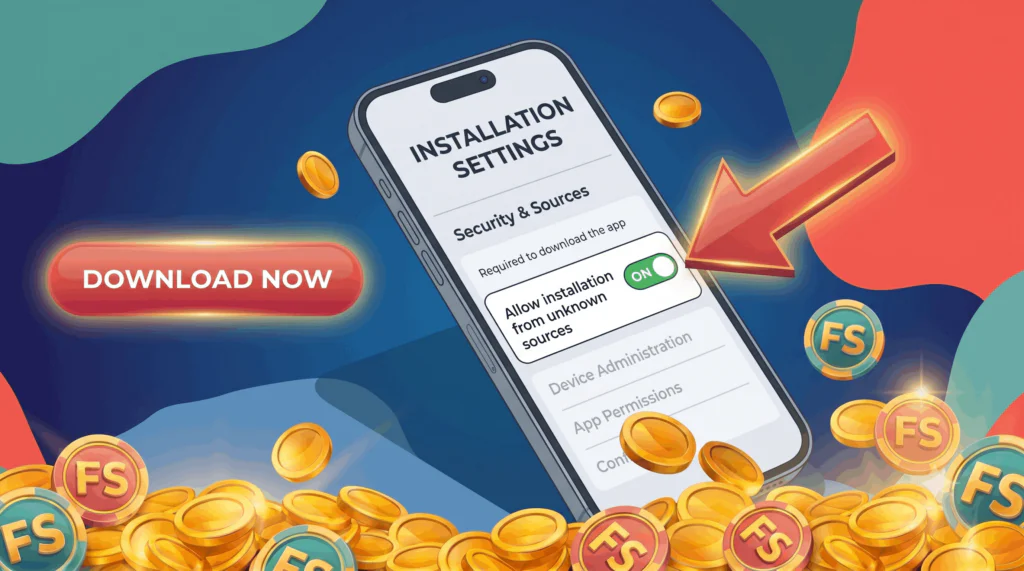
- Open your device’s security preferences and enable installations from external sources (rest assured, our package is thoroughly verified and safe).
- Open your local downloads folder, tap the downloaded package, and initiate the installation process.
- Launch the newly installed Evospin app, enter your credentials, and start playing immediately.
iOS Installation Guide
- Open the application from your home screen, authenticate your account, and enjoy unrestricted gaming.
- Visit our mobile download hub and click “Download for iOS”.
- Allow the configuration profile to download directly onto your iPhone or iPad.
- Open system Settings, proceed to Profiles & Device Management, and select “Trust” for the security profile.
Key Features of the Mobile App
Designed to deliver the full capabilities of our web platform directly to your mobile screen, our app provides a complete gaming ecosystem in your hands:
- Complete Gaming Arsenal: Enjoy high-volatility slots, live dealer tables, competitive poker lobbies, and live sports betting directly from one interface.
- Embedded Mobile Cashier: Deposit funds starting at €20 and request swift payouts using familiar regional payment methods or major cryptocurrencies.
- Personalized Push Alerts: Stay informed on upcoming promotional campaigns, seasonal tournaments, and prize drops with real-time mobile notifications.
- Thumb-Friendly Layout: Controls and navigation menus are optimized specifically for effortless single-handed operation on any display size.
- Round-the-Clock Assistance: Connect with support agents 24/7 directly via built-in live chat, email, or official social network channels.
- Enhanced Efficiency & Perks: Benefit from near-instant loading times, lower data consumption, and application-exclusive bonuses upon completing the Evospin download.
Our software engineers have tailored the Evospin mobile application to ensure your gaming experience remains ultra-fast, seamless, and uncompromising. Fire up the app on your phone, make a deposit, and immerse yourself in top-tier gaming today!
Native App vs. Mobile Browser Version
While Dutch users can access our platform using any standard web browser, using the dedicated Evospin mobile app offers distinct performance advantages. Browsers work well for casual play while enjoying a quick bitterbal at a local pub, but our native application drastically outperforms browser tabs with faster execution speeds, reduced data usage, and unwavering stability during high-demand Eredivisie matches.
| Feature Comparison | Evospin Mobile App | Evospin Mobile Site |
| Battery Usage | Optimized energy efficiency | Higher power consumption |
| Connection Dependency | Operates reliably on weak or unstable signals | Demands a strong, continuous connection |
| Promotional Access | Direct unlock of exclusive app-only bonuses | Standard promotional availability |
| Performance & Speed | Fine-tuned for quick, lag-free navigation | Prone to slowdowns during heavy traffic |
| Special Features | Includes bonus features like partial offline functionality | Basic mobile features without extras |
Creating an Account & Sign-In Steps
To engage in real-money wagering across our game suite, establishing an account is essential. We have designed a unified onboarding system that seamlessly synchronizes across desktop and mobile devices, ensuring you never miss a kickoff before an important Eredivisie fixture. A single profile registration grants immediate access across all your devices.
1. Account Registration
Setting up your account requires under sixty seconds. You can either complete the brief standard form or authenticate immediately via your social accounts on Facebook, Instagram, or Twitter. Provide your email address or mobile number, generate a secure password, choose EUR (€) as your default account currency, and input any promotional code you possess. Finally, confirm that you are at least 18 years old and accept our terms and conditions. Upon submission, your profile activates instantly, unlocking our full catalog of online casino offerings.
2. Sign-In Instructions
Access your profile anytime using your registered email or phone number paired with your chosen password, or log in instantly through a linked Twitter, Instagram, or Facebook account. Should you misplace your password, clicking the “Forgot password?” link generates an automated recovery link sent straight to your email. Integrated session persistence within the Evospin application keeps you signed in, while the desktop site saves your settings for effortless future access.
3. Identity Verification (KYC)
Prior to processing your initial payout or upon meeting specific transfer volume thresholds, our security team will conduct a quick standard KYC check. You simply need to provide a clear copy of an official identity document (ID card or passport) alongside a recent proof of residence, such as a utility statement. Submissions are typically processed in just a few hours, protecting your Evospin account and guaranteeing seamless withdrawal requests throughout the Netherlands.
Register today, top up with €20 or more, and unlock your bonus cash without delay!
Install the Evospin Casino Software and Join the Action
Why rely on sluggish browser pages when you can unleash our platform’s full processing speed directly on your mobile device? Designed specifically for Netherlands-based players, our app eliminates unnecessary wait times—allowing you to execute swift InstaBank withdrawals, place quick live wagers on Eredivisie fixtures, or spin high-volatility slot reels seamlessly. Grab a cold biertje, initiate your Evospin download today, create your profile in under a minute, and secure your special mobile welcome reward!
Frequently Asked Questions (FAQ)
Click the “Forgot password?” option directly on the app’s login interface. Provide your registered email or phone number, and an automated recovery link or SMS security code will be dispatched immediately to help you restore access in moments.
 Is social media or mobile login supported?
 What causes account login issues?
What if my verification code or email fails to arrive?
How do I keep my account secure during sign-in?
What causes account login issues?
What if my verification code or email fails to arrive?
How do I keep my account secure during sign-in?